Recent Posts

Character Building
Tony-nominated actors perform scenes from their shows out of costume but in character.
Backstage at the First Fashion Week Show
Experience the frenzy and interconnectivity of backstage at the first show at Lincoln...
A Financial House Advantage
An animated explanation of how banks use securities lending to make a profit, while...
Chasing a Police Scanner
Reporter Corey Kilgannon, Marcus Yam and myself chased calls over a police scanner...
Music Videos for The New York Times Magazine
Eli "Paperboy" Reed performs the title track from his new album and a proof of concept...
Popular Posts

Behind the Scenes of LENS
Posted by: Zach Wise
Tags:
Flash, Interactive, The New York Times
Posted date:
June 1, 2009 |
11 Comments

Screen-shot of the LENS Homepage
A few people have been asking me how the LENS Blog on The New York Times site came to be and what software it was built on. I thought I’d shed a little light on the development process and answer some of these questions.
Why does it scroll sideways?
When we started this project many months ago, The Big Picture was obviously one of the successful models for a photo blog, not just in terms of traffic but also in terms of presenting photographs in my favorite way. BIG.
When you go as big as The Big Picture, you can run into big problems. Depending on your monitor, the photos can’t fit on your screen. Scrolling through many large photos causes you to have scrolling precision and dexterity for an optimal viewing experience. Slide-shows on the other hand are easy to view. The scroll position remains the same and the photos scroll. We started to think of the LENS blog as a slide-show, and slide-shows within slide-shows. We fell in love with the idea of being able to stay on one page and have a mass consumption of images.
Mock-ups and Design Evolution
My first crack at a mock-up was fairly traditional and was concerned with finding a way to make the image as large as possible
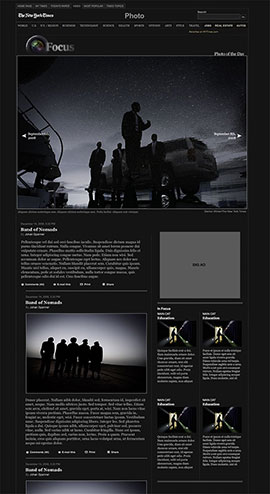
As our thinking evolved to the side-scrolling approach, we mocked-up some quick Fireworks working pages so we could see what it would feel like.



WordPress, Flash and XML Driven
All of the NYTimes’ blogs are produced in WordPress. WordPress has a great API and allows you to customize the data from posts for things like RSS feeds and XML feeds without much effort.
For the homepage of LENS we built a Flash presentation that takes a custom XML feed from wordpress. The real reason we went with Flash for the front-end presentation was because of it’s full screen ability.
You can see in the spec screen-shots on the right, that we are using existing wordpress variables to construct the feed for flash. You may also notice a “custom field“. This is where we link to the slide-show, and video xml feeds exported by existing tools we use on NYTimes.com everyday.


Obviously this is a quick overview of how LENS came together and how it works. If you have specific questions, hit me up in the comments and I’ll try and answer them as best I can.
About the author

Zach Wise is an award-winning former Senior Multimedia Producer for The New York Times and Associate Professor at Northwestern University.
Related Posts

Thirst in the Mojave
Thirst in the Mojave tries to bring a little more web mentality to video but still utilize the linear narrative strengths that make video such a great...
Coolris and Flickr make an easy Photowall
The Wall Street Journal used the new Cooliris flash embed for it's Year in Pictures. You can too.
Hybrid Flash Soundslides/Video Player
The player was designed to be modular, customizable and size independent. The player has the ability to display chapters, which is extremely useful for larger...
-
http://www.innovativeinteractivity.com Tracy Boyer
-
http://collegewebguy.com Drew
-
http://collegewebguy.com Drew
-
http://zachwise.com/ Zach Wise
-
http://www.innovativeinteractivity.com Tracy Boyer
-
http://www.aphotoaday.org/blog/?p=749 Behind the Scenes of LENS
-
http://robfinchphoto.com rob
-
http://zachwise.com/ Zach Wise
-
Leonardo
-
http://duncanshears.wordpress.com/2009/08/01/war-without-borders-fueling-mexicos-drug-trade/ War without Borders: Fueling Mexicos Drug Trade «
-
http://www.markzonder.com/ Amy