Recent Posts

Character Building
Tony-nominated actors perform scenes from their shows out of costume but in character.
Backstage at the First Fashion Week Show
Experience the frenzy and interconnectivity of backstage at the first show at Lincoln...
A Financial House Advantage
An animated explanation of how banks use securities lending to make a profit, while...
Chasing a Police Scanner
Reporter Corey Kilgannon, Marcus Yam and myself chased calls over a police scanner...
Music Videos for The New York Times Magazine
Eli "Paperboy" Reed performs the title track from his new album and a proof of concept...
Popular Posts

Pogue-o-matic
Posted by: Zach Wise
Tags:
Interactive, The New York Times
Posted date:
November 26, 2008 |
2 Comments
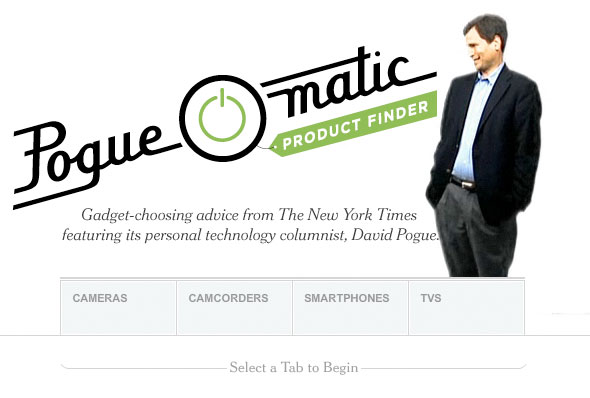
Screenshot of Pogue-o-matic
This wasn’t a typical project for me. It’s a little less serious then projects I usually like to work on, but variety is good. This is also the first project in quite a while in which I worked with green-screen video. The setup for the shoot was sort of a hack, with gaffer taped green sheets on the floor and hanging from the ceiling. Honestly, the green-screen shoot was the easy part of this project.
From: Our New Gadget Blog, the Pogue-o-matic and More
Through the miracle of modern video editing, we’ve created an interactive product finder featuring a wee-size David Pogue who can guide you through the process as you find the right gadget for you. For this version, we’re focusing on cameras, camcorders, smartphones and televisions. As Pogue explains your options and you make your choices, you’ll see what started as a large mess of products turn into a smaller, more manageable group that fits the description you created. You can then get access to more information to make your choice with ease.
Nasty Cookie
The interactive uses a flash cookie of sorts called SharedObject to remember your choices across sessions and even browsers on the same machine. For some flash enthusiasts, this is nothing new. It was new to me. It was also a little problematic. The cookie is hard to clear once it’s been created which caused some problems in beta testing. During the soft-launch we quickly discovered a nasty bug that appears only when a new cookie is created. Since we already had a cookie from testing we never saw the bug. In case you ever use SharedObject, be sure to bookmark this link. It’s the only way to kill the cookie.
Easter Eggs
Remember Easter Eggs? I do. I love ‘em.
Here’s a way to find one of the easter eggs in the Pogue-o-matic.
Enter the Contra code:
↑ ↑ ↓ ↓ ← → ← → B A ENTER
It’s worth it!
There are a lot more details I can share about this project. Let me know in the comments if you have questions about anything.
About the author

Zach Wise is an award-winning former Senior Multimedia Producer for The New York Times and Associate Professor at Northwestern University.
Related Posts

Behind the Scenes of LENS
A few people have been asking me how the LENS Blog on The New York Times site came to be and what software it was built on. I thought I'd shed a little...

Thirst in the Mojave
Thirst in the Mojave tries to bring a little more web mentality to video but still utilize the linear narrative strengths that make video such a great...
The History of Las Vegas Project is LIVE!
Today is Las Vegas' Birthday and today we launched The History of Las Vegas Project to celebrate.
-
http://williamcouch.com William Couch
-
Bob